


Download X Character Info, a minimalistic and highly optimized (0.00ms) information display system for FiveM servers. Designed for QBCore, ESX, and standalone frameworks, this lightweight HUD provides all essential player information — name, ID, job, cash, and bank balance — in a clean, professional layout that won’t impact your server’s performance.
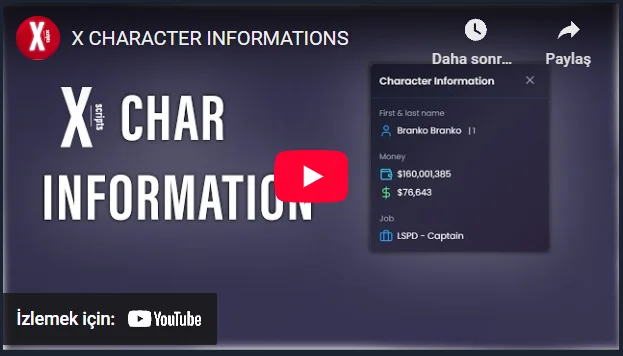
The X Character Info HUD is built for both RP and PVP servers that value clarity and smooth gameplay. It delivers essential data to players without cluttering the screen or affecting FPS. With its minimal resource usage, it’s ideal for competitive and roleplay environments alike.
✔ Ultra-Lightweight Performance (0.00ms Idle)
✔ Displays Player Name, ID, Cash, Bank & Job
✔ Supports QBCore, ESX, and Standalone Frameworks
✔ Clean & Minimalistic UI Design
✔ Perfect for RP & PVP Servers
Key Features:
 Essential Player Info: Shows first and last name, job title, grade, and player ID.
 Financial Display: View cash and bank balance directly on-screen.
 Minimalist Layout: Simple yet elegant UI that complements any server theme.
 Ultra-Optimized: Consumes 0.00ms idle — zero lag, zero performance loss.
 Configurable: Adjust colors, positioning, or font to fit your server’s branding.
 Framework Support: Works seamlessly across QBCore, ESX, or standalone servers.
Installation Guide:
 Download and extract X Character Info.
 Move the folder into your resources/[hud]/ directory.
 Add ensure x-characterinfo to your server.cfg.
 Restart your server and adjust display settings in config.lua if needed.
Keep your FiveM UI clean, professional, and efficient with X Character Info — the fastest, simplest, and most performance-friendly character info HUD available.
Keywords: X Character Info FiveM, optimized HUD FiveM, QBCore character info, ESX player display, 0.00ms HUD, minimalist UI, roleplay HUD, PVP HUD, cash bank job HUD, lightweight FiveM script
The X Character Info HUD is built for both RP and PVP servers that value clarity and smooth gameplay. It delivers essential data to players without cluttering the screen or affecting FPS. With its minimal resource usage, it’s ideal for competitive and roleplay environments alike.
✔ Ultra-Lightweight Performance (0.00ms Idle)
✔ Displays Player Name, ID, Cash, Bank & Job
✔ Supports QBCore, ESX, and Standalone Frameworks
✔ Clean & Minimalistic UI Design
✔ Perfect for RP & PVP Servers
Key Features:
Essential Player Info: Shows first and last name, job title, grade, and player ID. Financial Display: View cash and bank balance directly on-screen. Minimalist Layout: Simple yet elegant UI that complements any server theme. Ultra-Optimized: Consumes 0.00ms idle — zero lag, zero performance loss. Configurable: Adjust colors, positioning, or font to fit your server’s branding. Framework Support: Works seamlessly across QBCore, ESX, or standalone servers.Installation Guide:
Download and extract X Character Info. Move the folder into your resources/[hud]/ directory. Add ensure x-characterinfo to your server.cfg. Restart your server and adjust display settings in config.lua if needed.Keep your FiveM UI clean, professional, and efficient with X Character Info — the fastest, simplest, and most performance-friendly character info HUD available.
Keywords: X Character Info FiveM, optimized HUD FiveM, QBCore character info, ESX player display, 0.00ms HUD, minimalist UI, roleplay HUD, PVP HUD, cash bank job HUD, lightweight FiveM script
Last edited by a moderator: