


- #1
Thread Owner
: toxicfivem
Download the CodeM Venice HUD — a free and open-source HUD system for FiveM servers. Designed for modern roleplay and freeroam experiences, this lightweight and visually clean interface displays all essential player stats in real time, including health, armor, hunger, thirst, and vehicle data. Built by CodeM, the Venice HUD delivers both high performance and full customization for developers and server owners alike.
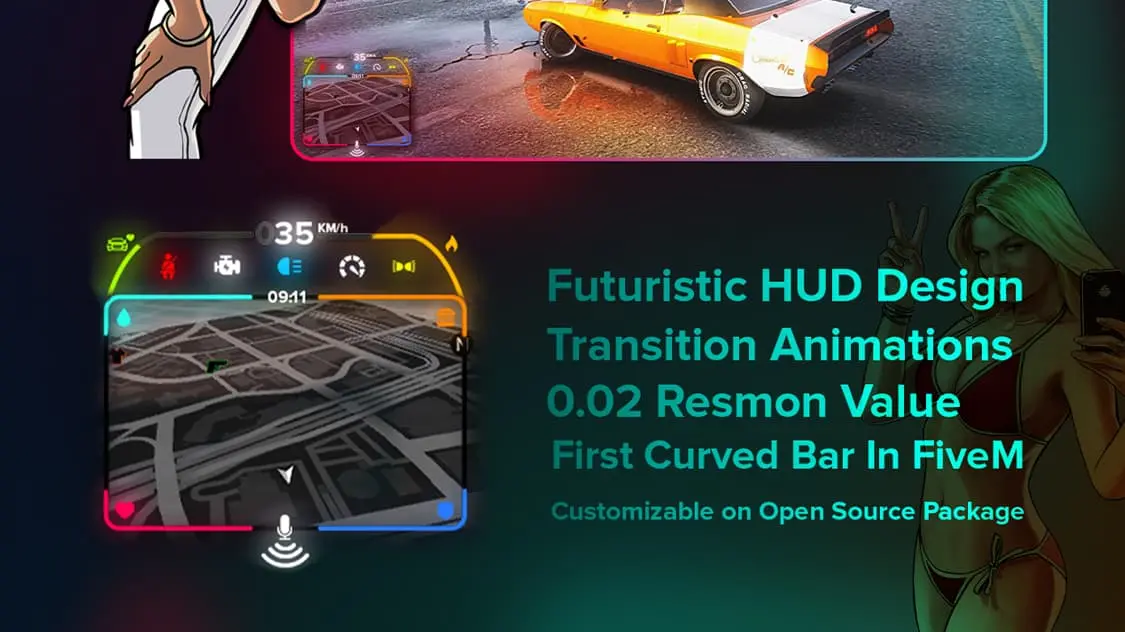
The Venice HUD features a smooth, minimalist layout inspired by modern gaming UIs. Every element — from color palette and transparency to positioning and animation — can be easily customized. It integrates seamlessly with ESX, QB-Core, and standalone frameworks, making it a perfect choice for any server setup that values clarity, performance, and design.
✔ Free & Open-Source – Modify and expand the code freely
✔ Modern & Minimalist Design – Clean UI focused on readability
✔ Displays Core Stats: Health, Armor, Hunger, Thirst, and Stamina
✔ Vehicle HUD: Speed, Fuel, and Seatbelt Indicators
✔ Works with ESX, QB-Core, or Standalone Servers
✔ Optimized for Low Resmon Usage (0.00ms Idle)
Key Features:
 Customizable Layout & Colors: Edit config.lua or NUI files to match your server’s branding.
 Dynamic Vehicle Integration: Automatically displays car HUD when driving.
 Performance Friendly: Lightweight and optimized for smooth operation.
 Open-Source Flexibility: Easily modify or extend the HUD’s functionality.
Installation Guide:
 Download and extract the CodeM Venice HUD.
 Move the folder into your server’s resources/[hud]/ directory.
 Add ensure codem-venicehud to your server.cfg.
 Configure visual settings in config.lua.
 Restart your FiveM server and enjoy.
Enhance your FiveM experience with the CodeM Venice HUD — a free, modern, and open-source HUD solution built for performance and style.
Keywords: FiveM Venice HUD, CodeM HUD, free FiveM HUD, open-source HUD script, ESX HUD, QB-Core HUD, modern roleplay UI, vehicle HUD, customizable HUD, optimized FiveM UI
The Venice HUD features a smooth, minimalist layout inspired by modern gaming UIs. Every element — from color palette and transparency to positioning and animation — can be easily customized. It integrates seamlessly with ESX, QB-Core, and standalone frameworks, making it a perfect choice for any server setup that values clarity, performance, and design.
✔ Free & Open-Source – Modify and expand the code freely
✔ Modern & Minimalist Design – Clean UI focused on readability
✔ Displays Core Stats: Health, Armor, Hunger, Thirst, and Stamina
✔ Vehicle HUD: Speed, Fuel, and Seatbelt Indicators
✔ Works with ESX, QB-Core, or Standalone Servers
✔ Optimized for Low Resmon Usage (0.00ms Idle)
Key Features:
Customizable Layout & Colors: Edit config.lua or NUI files to match your server’s branding. Dynamic Vehicle Integration: Automatically displays car HUD when driving. Performance Friendly: Lightweight and optimized for smooth operation. Open-Source Flexibility: Easily modify or extend the HUD’s functionality.Installation Guide:
Download and extract the CodeM Venice HUD. Move the folder into your server’s resources/[hud]/ directory. Add ensure codem-venicehud to your server.cfg. Configure visual settings in config.lua. Restart your FiveM server and enjoy.Enhance your FiveM experience with the CodeM Venice HUD — a free, modern, and open-source HUD solution built for performance and style.
Keywords: FiveM Venice HUD, CodeM HUD, free FiveM HUD, open-source HUD script, ESX HUD, QB-Core HUD, modern roleplay UI, vehicle HUD, customizable HUD, optimized FiveM UI
Last edited: