


- #1
Thread Owner
: toxicfivem
Download the FiveM ESX Multicharacter, Identity, and Loading Screen Redesign, a complete and optimized system for ESX-based servers. This package includes a modern multicharacter UI, an identity registration system, and a custom loading screen for enhanced immersion and roleplay experience.
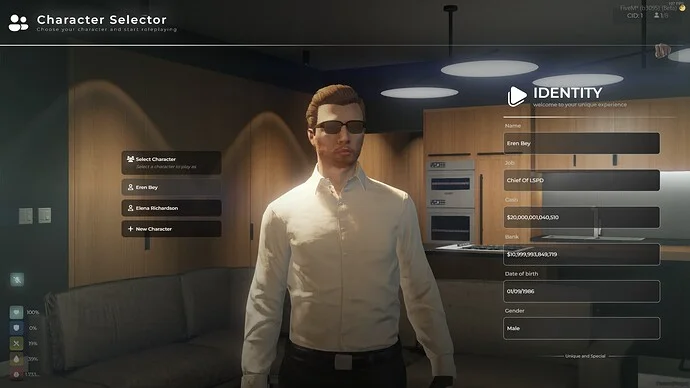
The ESX Multicharacter & Identity System allows players to register their in-game identity (name, date of birth, gender) and then choose from multiple characters through an elegant selection menu. The redesigned loading screen provides a professional and seamless introduction when joining your server.
✔ Compatible with ESX Framework – Works perfectly with all ESX-based setups.
✔ Modern Multicharacter Interface – Lets players create and switch between characters.
✔ Identity Registration System – Stores player info securely in the database.
✔ Custom Loading Screen – Stylish and lightweight loading design.
✔ Optimized Performance – Runs smoothly with low resmon usage.
How It Works:
 Players register their identity upon first joining.
A sleek multicharacter menu appears for character selection.
The loading screen ensures a smooth transition into gameplay.
Key Features:
✔ Redesigned ESX Identity UI
✔ Multicharacter System with Database Integration
✔ Fully Customizable Loading Screen
✔ Lightweight & Optimized for ESX Servers
 Installation Steps:
 Extract all folders (identity, multicharacter, loading screen).
 Move them to your resources directory.
 Add each script in your server.cfg file:
ensure esx_identity
ensure esx_multicharacter
ensure esx_loading
 Restart your server to apply the setup.
FiveM ESX multicharacter, FiveM identity system, ESX loading screen, FiveM character creation, ESX roleplay system, FiveM ESX script pack, ESX UI redesign, FiveM multicharacter system, FiveM roleplay setup, ESX script download
The ESX Multicharacter & Identity System allows players to register their in-game identity (name, date of birth, gender) and then choose from multiple characters through an elegant selection menu. The redesigned loading screen provides a professional and seamless introduction when joining your server.
✔ Compatible with ESX Framework – Works perfectly with all ESX-based setups.
✔ Modern Multicharacter Interface – Lets players create and switch between characters.
✔ Identity Registration System – Stores player info securely in the database.
✔ Custom Loading Screen – Stylish and lightweight loading design.
✔ Optimized Performance – Runs smoothly with low resmon usage.
How It Works:
Players register their identity upon first joining. A sleek multicharacter menu appears for character selection. The loading screen ensures a smooth transition into gameplay.Key Features:
✔ Redesigned ESX Identity UI
✔ Multicharacter System with Database Integration
✔ Fully Customizable Loading Screen
✔ Lightweight & Optimized for ESX Servers
Installation Steps: Extract all folders (identity, multicharacter, loading screen). Move them to your resources directory. Add each script in your server.cfg file:ensure esx_identity
ensure esx_multicharacter
ensure esx_loading
Restart your server to apply the setup.FiveM ESX multicharacter, FiveM identity system, ESX loading screen, FiveM character creation, ESX roleplay system, FiveM ESX script pack, ESX UI redesign, FiveM multicharacter system, FiveM roleplay setup, ESX script download
Last edited: