


- #1
Thread Owner
: toxicfivem
Download the FiveM Info HUD Script for QB-Core — a modern, lightweight, and performance-optimized information display system that shows real-time player details such as job, gang, ID, cash, bank balance, and ammo count. This fully customizable HUD enhances player awareness and immersion, making it perfect for roleplay and combat-based servers.
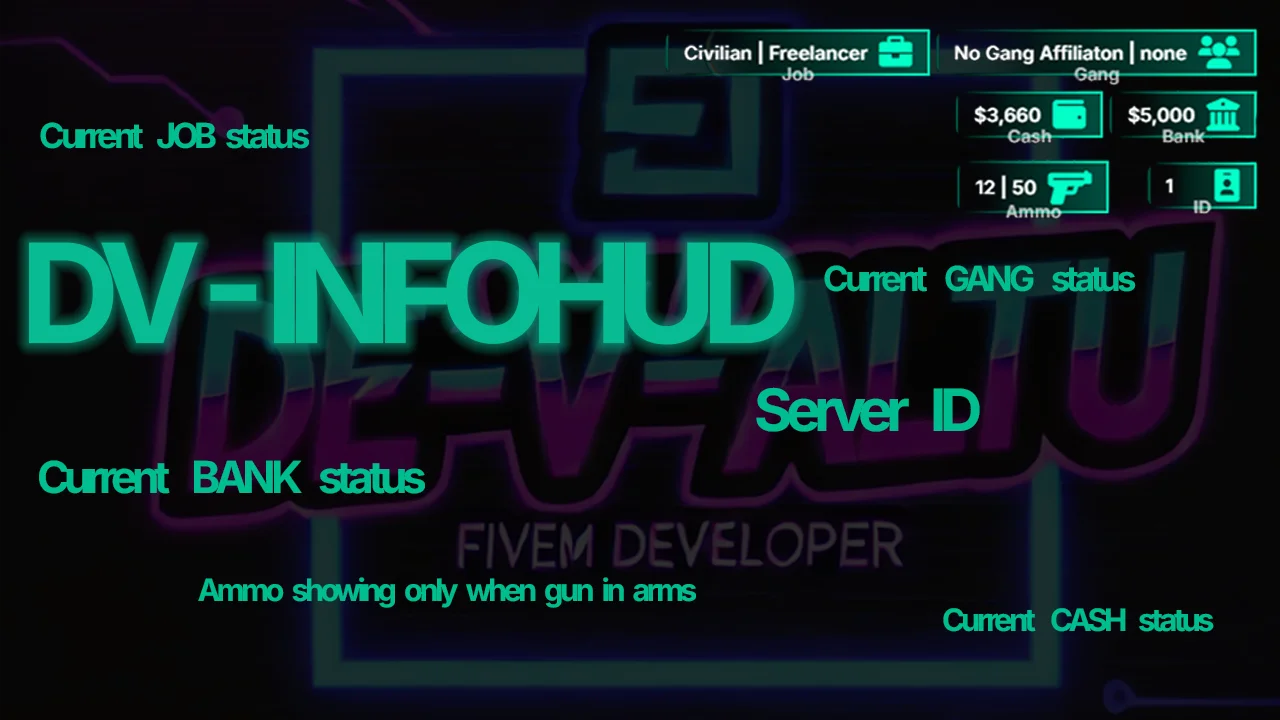
The dv-infohud provides an intuitive layout that updates dynamically without impacting server performance. Players can see their financial status, organization details, and equipped weapon ammo at a glance. The HUD automatically adjusts its visibility and runs efficiently using a 500ms update interval, ensuring smooth gameplay and zero lag.
✔ Built for QB-Core Framework
✔ Real-Time Job & Gang Display
✔ Shows Player ID, Cash & Bank Balance
✔ Dynamic Ammo Counter for Equipped Weapon
✔ Optimized Performance (Low Resmon Usage)
✔ Customizable via config.lua
Installation Guide:
 Download and extract the dv-infohud folder.
 Move it into your server’s resources/[hud]/ directory.
 Open your server.cfg and add:
ensure dv-infohud
 Configure the HUD by editing config.lua:
How It Works:
 Displays player job, gang, and rank in real-time.
Shows cash and bank balances directly on the screen.
Includes a live ammo counter for equipped weapons.
Automatically hides when the player opens the pause menu.
Key Features:
 Dynamic & Real-Time Updates
 Customizable HUD Elements
 Fully Optimized for QB-Core
 Immersive Design with Minimal Impact
Enhance your roleplay experience with the FiveM Info HUD — a sleek and efficient interface for tracking essential player stats in real time.
Keywords: FiveM Info HUD, QB-Core HUD, job display HUD, cash HUD FiveM, ammo counter script, roleplay HUD, optimized info HUD, player ID HUD, dv-infohud FiveM, real-time status HUD
The dv-infohud provides an intuitive layout that updates dynamically without impacting server performance. Players can see their financial status, organization details, and equipped weapon ammo at a glance. The HUD automatically adjusts its visibility and runs efficiently using a 500ms update interval, ensuring smooth gameplay and zero lag.
✔ Built for QB-Core Framework
✔ Real-Time Job & Gang Display
✔ Shows Player ID, Cash & Bank Balance
✔ Dynamic Ammo Counter for Equipped Weapon
✔ Optimized Performance (Low Resmon Usage)
✔ Customizable via config.lua
Installation Guide:
Download and extract the dv-infohud folder. Move it into your server’s resources/[hud]/ directory. Open your server.cfg and add:ensure dv-infohud
Configure the HUD by editing config.lua:- Enable or disable specific elements
- Adjust update speed and display options
 Restart your server to apply the changes.
How It Works:
Displays player job, gang, and rank in real-time. Shows cash and bank balances directly on the screen. Includes a live ammo counter for equipped weapons. Automatically hides when the player opens the pause menu.Key Features:
Dynamic & Real-Time Updates Customizable HUD Elements Fully Optimized for QB-Core Immersive Design with Minimal ImpactEnhance your roleplay experience with the FiveM Info HUD — a sleek and efficient interface for tracking essential player stats in real time.
Keywords: FiveM Info HUD, QB-Core HUD, job display HUD, cash HUD FiveM, ammo counter script, roleplay HUD, optimized info HUD, player ID HUD, dv-infohud FiveM, real-time status HUD
Last edited: