


Download the FiveM Remove Fog Script (ata_removefog) and enjoy crystal-clear skies with no in-game fog. This lightweight and easy-to-install script permanently removes fog from your FiveM server, giving players a cleaner, sharper, and more immersive visual experience. Perfect for roleplay, racing, and photography servers that value high visibility and smooth graphics.
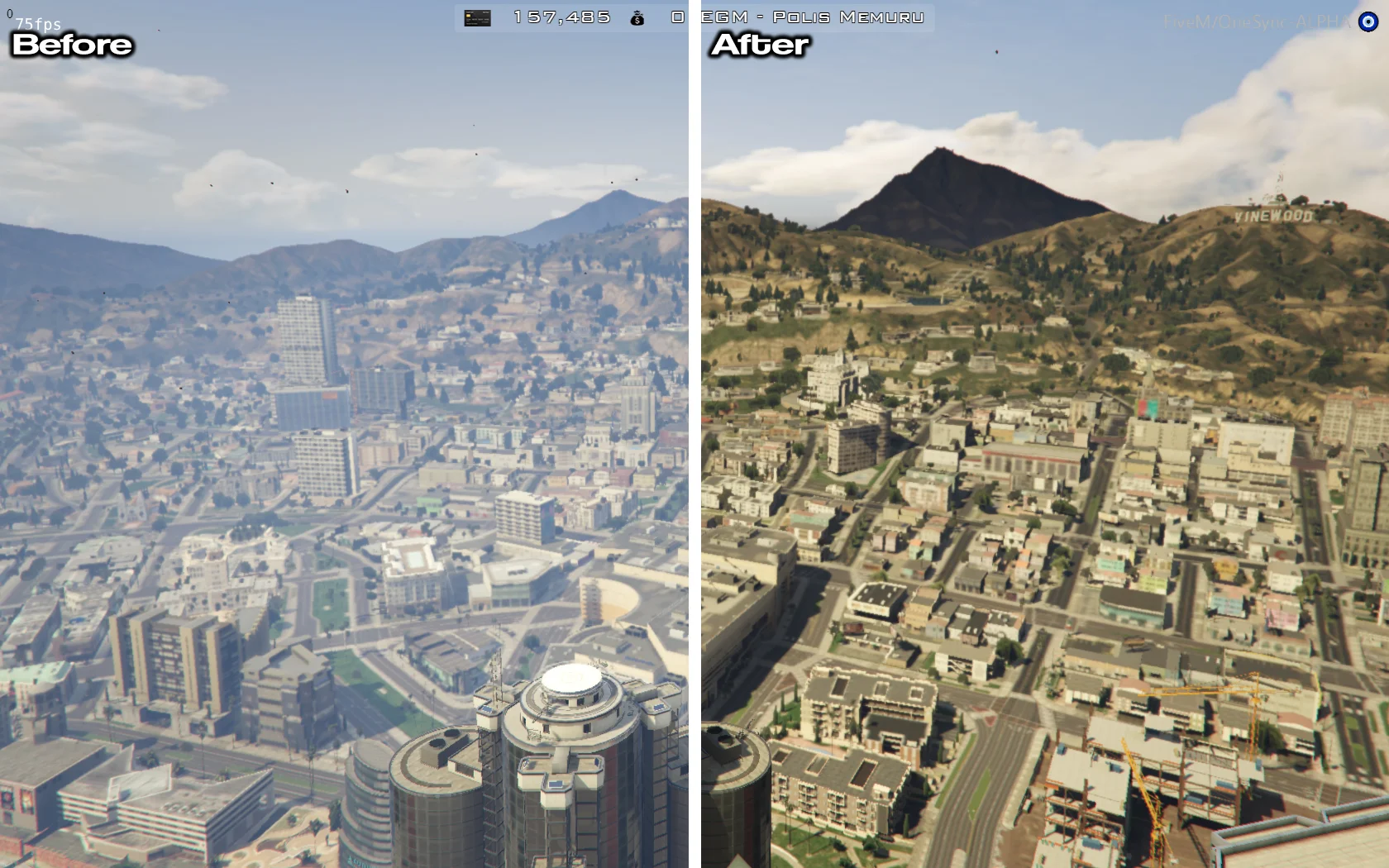
The Remove Fog Script adjusts FiveM’s weather system to disable fog layers entirely. As a result, players experience clear weather conditions, enhanced visibility, and improved visual quality across all environments — from city streets to mountain ranges.
✔ Removes In-Game Fog Completely
✔ Provides Clear Skies and Maximum Visibility
✔ Boosts Visual Quality for RP & Racing Servers
✔ Lightweight & Optimized Script
✔ Easy Installation and Setup
Installation Guide:
 Extract the downloaded ata_removefog.zip file.
 Move the ata_removefog folder into your server’s resources/[visuals]/ directory.
 Add the following line to your server.cfg:
ensure ata_removefog
 Restart your FiveM server to apply the changes.
How It Works:
The script modifies weather parameters in real time to ensure fog is never generated during gameplay. Players instantly notice:
🌤 Clear Skies: No obstructing haze or low-visibility conditions.
 Improved Distance View: Ideal for sniping, flying, or high-speed driving.
 Permanent Effect: Automatically runs every time your server starts.
Lightweight, stable, and fully tested, this script guarantees consistent, fog-free weather without affecting other environmental settings.
Upgrade your server’s atmosphere with the FiveM Remove Fog Script — the easiest way to achieve clear weather and enhanced visual realism.
Keywords: FiveM remove fog, clear weather script, fog disable FiveM, ata_removefog, FiveM visuals mod, high visibility script, FiveM graphics enhancement, racing server visuals
The Remove Fog Script adjusts FiveM’s weather system to disable fog layers entirely. As a result, players experience clear weather conditions, enhanced visibility, and improved visual quality across all environments — from city streets to mountain ranges.
✔ Removes In-Game Fog Completely
✔ Provides Clear Skies and Maximum Visibility
✔ Boosts Visual Quality for RP & Racing Servers
✔ Lightweight & Optimized Script
✔ Easy Installation and Setup
Installation Guide:
Extract the downloaded ata_removefog.zip file. Move the ata_removefog folder into your server’s resources/[visuals]/ directory. Add the following line to your server.cfg:ensure ata_removefog
Restart your FiveM server to apply the changes.How It Works:
The script modifies weather parameters in real time to ensure fog is never generated during gameplay. Players instantly notice:
🌤 Clear Skies: No obstructing haze or low-visibility conditions.
Improved Distance View: Ideal for sniping, flying, or high-speed driving. Permanent Effect: Automatically runs every time your server starts.Lightweight, stable, and fully tested, this script guarantees consistent, fog-free weather without affecting other environmental settings.
Upgrade your server’s atmosphere with the FiveM Remove Fog Script — the easiest way to achieve clear weather and enhanced visual realism.
Keywords: FiveM remove fog, clear weather script, fog disable FiveM, ata_removefog, FiveM visuals mod, high visibility script, FiveM graphics enhancement, racing server visuals
Last edited by a moderator: