


- #1
Thread Owner
: toxicfivem
Download the NoPixel 4.0 Inspired Inventory Script for QBCore, a fully optimized and customizable inventory system built for FiveM roleplay servers. Featuring a sleek, interactive UI and support for target-based interactions, this script brings the next level of immersion and realism to your QBCore setup — combining drag-and-drop inventory, quick slots, and item handling integration with ox_target and qb-target.
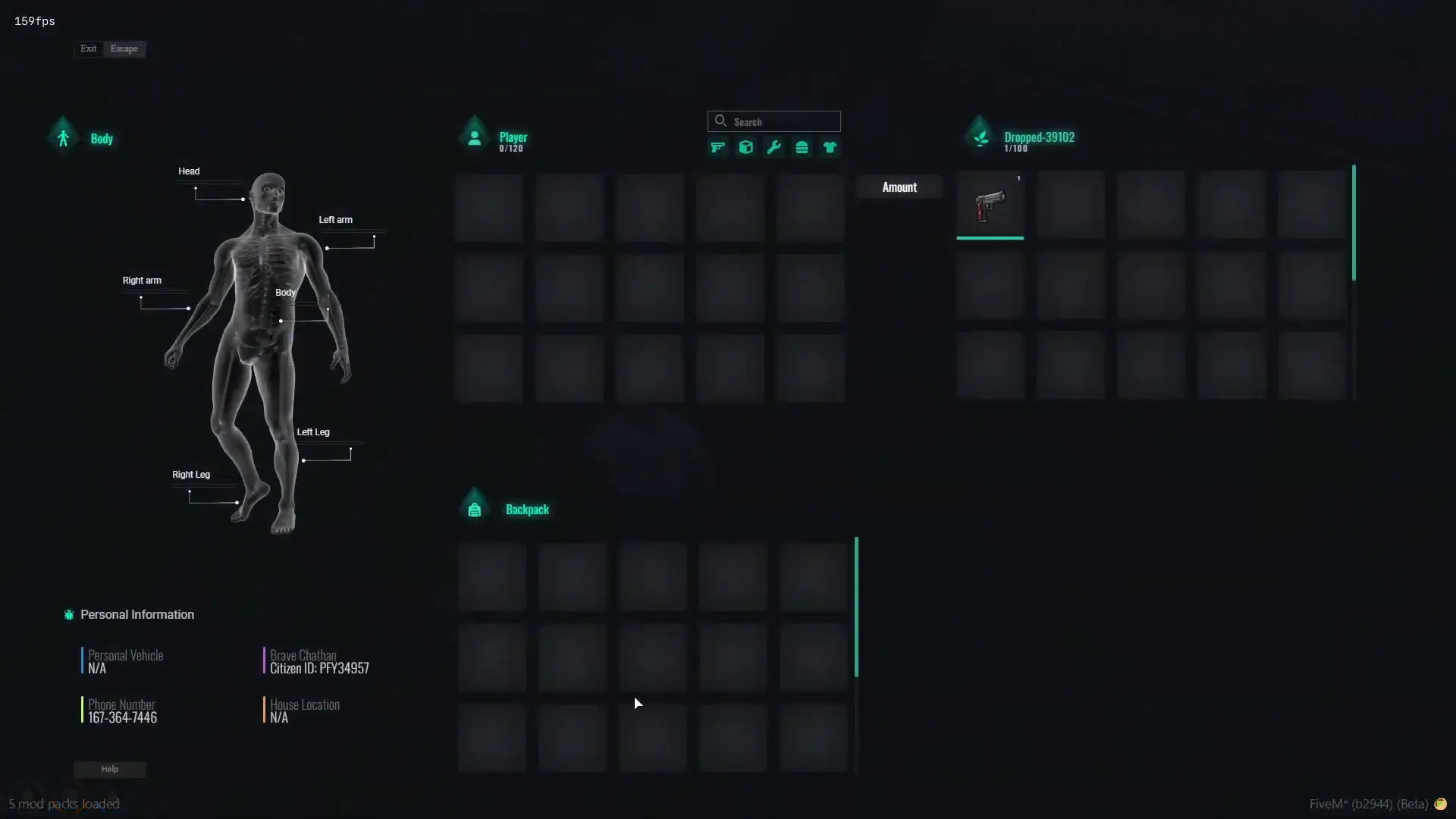
The NoPixel 4.0 Inventory System (qb-inventory) delivers both performance and flexibility, providing a modern look while remaining lightweight and server-friendly. With customizable item categories, weight systems, and smooth animations, it enhances every aspect of player inventory management.
This script requires the following dependencies:
 Download ox_target or qb-target
✔ Built for QBCore Framework
✔ Inspired by NoPixel 4.0 Design
✔ Drag & Drop Inventory + Quick Slots
✔ Target-Based Item Interactions (ox_target / qb-target)
✔ Fully Customizable Config Files
✔ Optimized for High-Performance Roleplay Servers
Key Features:
 Modern UI Design: Clean and responsive interface modeled after NoPixel’s immersive layout.
 Drag & Drop System: Manage items easily between inventory, hotbar, and storage.
 Target-Based Integration: Use ox_target or qb-target for realistic in-world item interactions.
 Full Config Control: Modify slot limits, categories, and behaviors in config.lua.
 Performance Optimized: Lightweight build ensures smooth gameplay and low resmon usage.
 Seamless Framework Integration: Works directly with QBCore exports and core functions.
Installation Guide:
 Download and extract qb-inventory.
 Place the folder inside your resources/[inventory]/ directory.
 Add ensure qb-inventory to your server.cfg.
 Update your QBCore files:
Bring the power of NoPixel 4.0’s advanced inventory experience to your QBCore server with this polished, efficient, and fully customizable inventory system.
Keywords: NoPixel 4.0 inventory, qb-inventory FiveM, QBCore inventory system, target-based inventory, ox_target inventory, qb-target integration, drag and drop inventory, NoPixel UI, roleplay inventory script, optimized QBCore HUD
The NoPixel 4.0 Inventory System (qb-inventory) delivers both performance and flexibility, providing a modern look while remaining lightweight and server-friendly. With customizable item categories, weight systems, and smooth animations, it enhances every aspect of player inventory management.
This script requires the following dependencies:
Download ox_target or qb-target✔ Built for QBCore Framework
✔ Inspired by NoPixel 4.0 Design
✔ Drag & Drop Inventory + Quick Slots
✔ Target-Based Item Interactions (ox_target / qb-target)
✔ Fully Customizable Config Files
✔ Optimized for High-Performance Roleplay Servers
Key Features:
Modern UI Design: Clean and responsive interface modeled after NoPixel’s immersive layout. Drag & Drop System: Manage items easily between inventory, hotbar, and storage. Target-Based Integration: Use ox_target or qb-target for realistic in-world item interactions. Full Config Control: Modify slot limits, categories, and behaviors in config.lua. Performance Optimized: Lightweight build ensures smooth gameplay and low resmon usage. Seamless Framework Integration: Works directly with QBCore exports and core functions.Installation Guide:
Download and extract qb-inventory. Place the folder inside your resources/[inventory]/ directory. Add ensure qb-inventory to your server.cfg. Update your QBCore files:- qb-core/client/functions.lua
- qb-core/server/functions.lua
- qb-core/server/player.lua
Replace existing inventory exports (e.g., from e.g-inventory) with qb-inventory.
 Restart your FiveM server.
Bring the power of NoPixel 4.0’s advanced inventory experience to your QBCore server with this polished, efficient, and fully customizable inventory system.
Keywords: NoPixel 4.0 inventory, qb-inventory FiveM, QBCore inventory system, target-based inventory, ox_target inventory, qb-target integration, drag and drop inventory, NoPixel UI, roleplay inventory script, optimized QBCore HUD
Last edited: