


Download the NoPixel 4.0 Inventory Script for QBCore, a modern and fully optimized drag-and-drop inventory system for FiveM roleplay servers. Inspired by NoPixel’s clean and immersive design, this inventory brings realism, smooth interaction, and efficient resource management to your QBCore setup — all with a sleek, responsive interface.
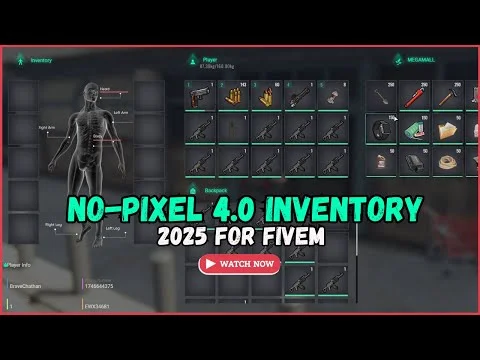
The NoPixel 4.0 Inventory features drag-and-drop item organization, weight-based storage, hotkey support, and detailed item descriptions, creating a seamless player experience. Its lightweight structure ensures optimal performance with minimal resmon usage, even on large servers with hundreds of players.
✔ Built for QBCore Framework
✔ Modern & Intuitive Drag-and-Drop UI
✔ Weight-Based Inventory System
✔ Supports Hotkeys & Item Descriptions
✔ Optimized for Smooth Performance
Key Features:
 Modern User Interface: Inspired by NoPixel 4.0, with clean visuals and responsive layout.
 Drag-and-Drop Management: Easily move, equip, or drop items using natural UI interactions.
 Weight System: Each item has a defined weight, limiting how much players can carry.
 Hotkey Integration: Assign items or weapons to numbered slots for quick access.
 Item Descriptions: Detailed information about each item improves clarity and immersion.
 Performance Optimized: Runs smoothly on any roleplay server with low CPU and memory use.
 Easy Customization: Modify item categories, weights, animations, and UI colors in config files.
Installation Guide:
 Download and extract the NoPixel 4.0 Inventory Script.
 Move the folder into your resources/[inventory]/ directory.
 Add ensure nopixel_inventory to your server.cfg.
 Configure the script via config.lua for item settings and UI preferences.
 Restart your server and enjoy your modern inventory system.
Upgrade your FiveM QBCore roleplay server with the NoPixel 4.0 Inventory Script — a sleek, immersive, and performance-friendly inventory system that redefines how players interact with their gear.
Keywords: NoPixel 4.0 inventory script, FiveM QBCore inventory, drag and drop inventory, weight system inventory, NoPixel-style UI, QBCore roleplay scripts, optimized FiveM inventory
The NoPixel 4.0 Inventory features drag-and-drop item organization, weight-based storage, hotkey support, and detailed item descriptions, creating a seamless player experience. Its lightweight structure ensures optimal performance with minimal resmon usage, even on large servers with hundreds of players.
✔ Built for QBCore Framework
✔ Modern & Intuitive Drag-and-Drop UI
✔ Weight-Based Inventory System
✔ Supports Hotkeys & Item Descriptions
✔ Optimized for Smooth Performance
Key Features:
Modern User Interface: Inspired by NoPixel 4.0, with clean visuals and responsive layout. Drag-and-Drop Management: Easily move, equip, or drop items using natural UI interactions. Weight System: Each item has a defined weight, limiting how much players can carry. Hotkey Integration: Assign items or weapons to numbered slots for quick access. Item Descriptions: Detailed information about each item improves clarity and immersion. Performance Optimized: Runs smoothly on any roleplay server with low CPU and memory use. Easy Customization: Modify item categories, weights, animations, and UI colors in config files.Installation Guide:
Download and extract the NoPixel 4.0 Inventory Script. Move the folder into your resources/[inventory]/ directory. Add ensure nopixel_inventory to your server.cfg. Configure the script via config.lua for item settings and UI preferences. Restart your server and enjoy your modern inventory system.Upgrade your FiveM QBCore roleplay server with the NoPixel 4.0 Inventory Script — a sleek, immersive, and performance-friendly inventory system that redefines how players interact with their gear.
Keywords: NoPixel 4.0 inventory script, FiveM QBCore inventory, drag and drop inventory, weight system inventory, NoPixel-style UI, QBCore roleplay scripts, optimized FiveM inventory
Last edited by a moderator: