


- #1
Thread Owner
: toxicfivem
Download the NoPixel-Inspired Inventory Script for FiveM QBCore, a next-generation inventory system designed for modern roleplay servers. Featuring a sleek UI, drag-and-drop functionality, hotkey support, and item weight tracking, this script brings the signature NoPixel-style realism and performance optimization directly to your QBCore server.
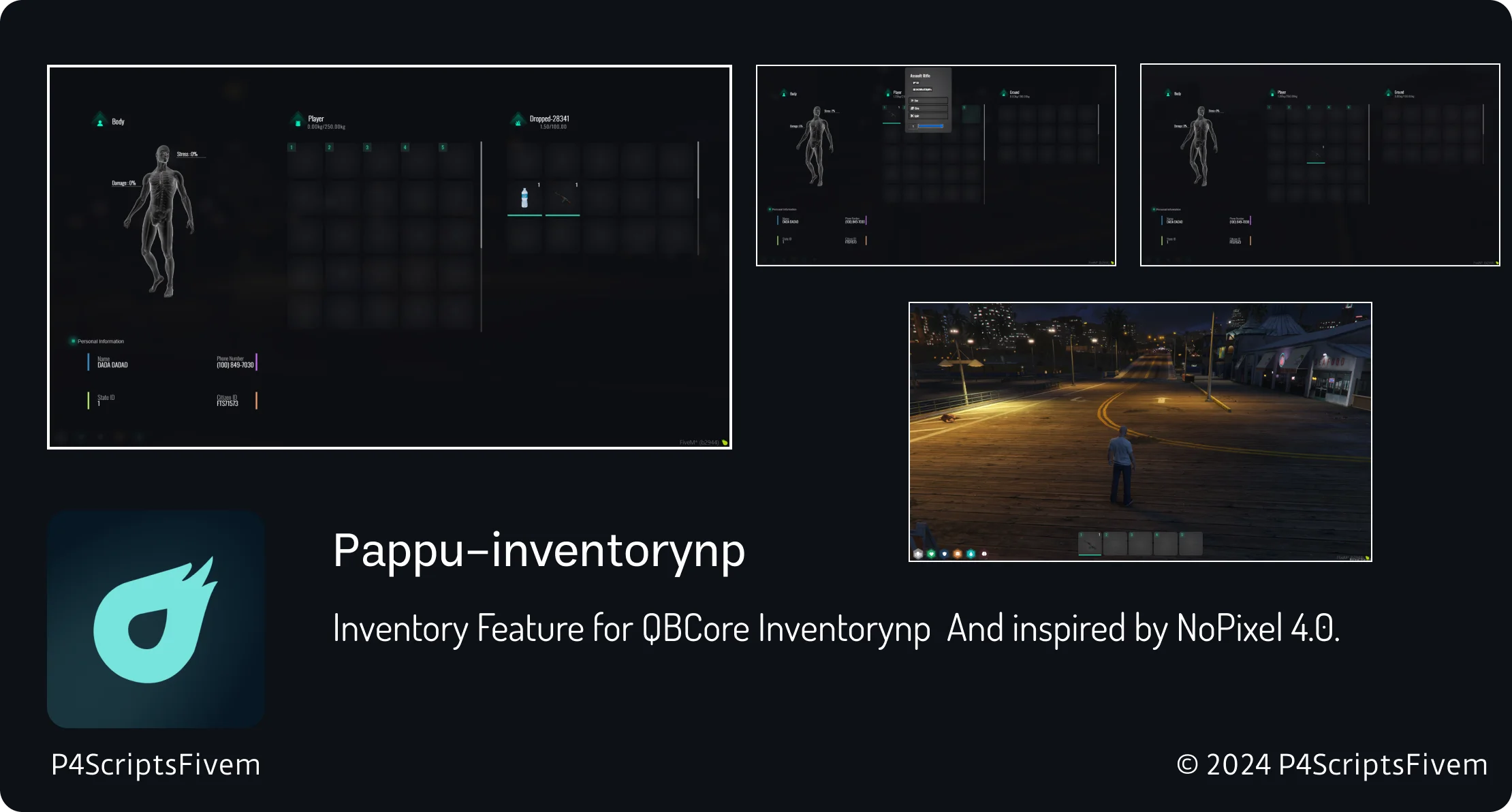
The NoPixel-Inspired Inventory (pappu-inventorynp) combines beauty and efficiency — allowing players to manage their items intuitively with a polished, responsive interface. From quick slot hotkeys to item decay and custom branding options, every detail is tailored for immersive roleplay and server flexibility.
✔ Fully Compatible with QBCore Framework
✔ Modern NoPixel 4.0-Inspired UI
✔ Drag & Drop Inventory with Hotkey Integration
✔ Item Weight & Decay System for Realism
✔ Customizable UI Elements & Server Branding
✔ Optimized for Performance (Low Resmon Usage)
Key Features:
 Sleek & Modern Design: Styled after NoPixel 4.0, with a clean and professional look.
 Drag-and-Drop Functionality: Players can organize and move items with smooth transitions.
 Weight-Based Inventory: Realistic item weight limits prevent overloading.
 Hotkey & Quick Slot System: Assign weapons, food, or items to number keys for instant use.
 Item Decay Mechanic: Adds depth to consumables and equipment with time-based degradation.
 Custom Branding: Replace icons, colors, or logos to match your server’s theme.
 Performance Optimized: Designed to run efficiently with minimal FPS or resmon impact.
Installation Guide:
 Download and extract pappu-inventorynp.
 Move the folder into your resources/[inventory]/ directory.
 Add ensure pappu-inventorynp to your server.cfg.
 Edit config.lua to set weight values, decay settings, and UI preferences.
 Restart your server and test the system.
Enhance your FiveM QBCore RP server with the NoPixel-Inspired Inventory Script — combining performance, design, and customization for the ultimate immersive inventory experience.
Keywords: NoPixel inventory FiveM, QBCore inventory script, pappu-inventorynp, drag and drop inventory, hotkey slots, item weight system, NoPixel-style HUD, optimized FiveM scripts
This script requires the following QB-Core updates:
 Download Latest QB-Core
Download QB-SmallResources
Download QB-Weapons
The NoPixel-Inspired Inventory (pappu-inventorynp) combines beauty and efficiency — allowing players to manage their items intuitively with a polished, responsive interface. From quick slot hotkeys to item decay and custom branding options, every detail is tailored for immersive roleplay and server flexibility.
✔ Fully Compatible with QBCore Framework
✔ Modern NoPixel 4.0-Inspired UI
✔ Drag & Drop Inventory with Hotkey Integration
✔ Item Weight & Decay System for Realism
✔ Customizable UI Elements & Server Branding
✔ Optimized for Performance (Low Resmon Usage)
Key Features:
Sleek & Modern Design: Styled after NoPixel 4.0, with a clean and professional look. Drag-and-Drop Functionality: Players can organize and move items with smooth transitions. Weight-Based Inventory: Realistic item weight limits prevent overloading. Hotkey & Quick Slot System: Assign weapons, food, or items to number keys for instant use. Item Decay Mechanic: Adds depth to consumables and equipment with time-based degradation. Custom Branding: Replace icons, colors, or logos to match your server’s theme. Performance Optimized: Designed to run efficiently with minimal FPS or resmon impact.Installation Guide:
Download and extract pappu-inventorynp. Move the folder into your resources/[inventory]/ directory. Add ensure pappu-inventorynp to your server.cfg. Edit config.lua to set weight values, decay settings, and UI preferences. Restart your server and test the system.Enhance your FiveM QBCore RP server with the NoPixel-Inspired Inventory Script — combining performance, design, and customization for the ultimate immersive inventory experience.
Keywords: NoPixel inventory FiveM, QBCore inventory script, pappu-inventorynp, drag and drop inventory, hotkey slots, item weight system, NoPixel-style HUD, optimized FiveM scripts
This script requires the following QB-Core updates:
Download Latest QB-Core Download QB-SmallResources Download QB-Weapons
Last edited: